Trial
$0
Every Pro feature for your first 30 minutes with the app running, or 30K AI tokens, whichever comes first. No credit card.
Start freeWe use essential cookies for sign-in. Site traffic is measured with cookieless, privacy-first analytics that store no personal data; accepting analytics additionally allows optional usage events that help us improve the product, and keeps a 90-day record in this browser of the advertisement or link you arrived from, which is sent to our own servers with your sign-up if you create an account. "Essential only" means we capture none of that. If you do not answer at all, we still record which link brought a sign-up — and nothing goes to any advertising network. See our Cookie Policy, Privacy Policy (section 16 covers advertising attribution), and Terms of Service.

incogno listens to your meeting, can read your screen, and starts answering within seconds. It is a native overlay for Mac and Windows, built for developers.
Free for your first 30 minutes with the app running, or 30K AI tokens, whichever comes first. No credit card.

 You

Yes, it retries. Failed deliveries are retried up to 5 times with exponential backoff: after 1 minute, 5 minutes, 30 minutes, 2 hours and 12 hours. Every attempt carries the same X-Event-Id, so the receiver can drop duplicates.
An example exchange: the answer starts appearing seconds after the question. Works alongside Zoom, Google Meet, Microsoft Teams, Webex and Slack Huddles, with no plugin to set up.
incogno sits in a small window on your screen. These are the calls it was built for.
Lost the thread during a long update? Get a short recap of what was just decided and who owns it.
Recap what was just said
Someone names a pattern or a service you have not touched. Get a plain explanation without leaving the call.
What is the outbox pattern?
Put the error on screen and ask. incogno reads the text on your screen and explains what the stack trace means.
Why is this request timing out?
A tricky question about limits or behavior comes up. Get a short answer you can say right away.
Do webhooks retry on failure?
A native overlay for Mac and Windows, not a browser extension and not a bot. It's designed to stay out of screen share.
Ask anything. incogno reads the live transcript and your screen, and starts answering within seconds.
What the others say is transcribed in real time over an encrypted connection. Our servers don't keep the audio.
incogno reads the text on your screen for better answers on code, slides, error messages and docs. On Pro and the trial, and when you use "What's on my screen", it can add a screenshot.
Reads the problem on your screen and writes code, with a short explanation.
Add your notes or project docs. incogno brings up the right part when a question comes up.
Catch up on what the others just said, so you can rejoin a thread you lost.
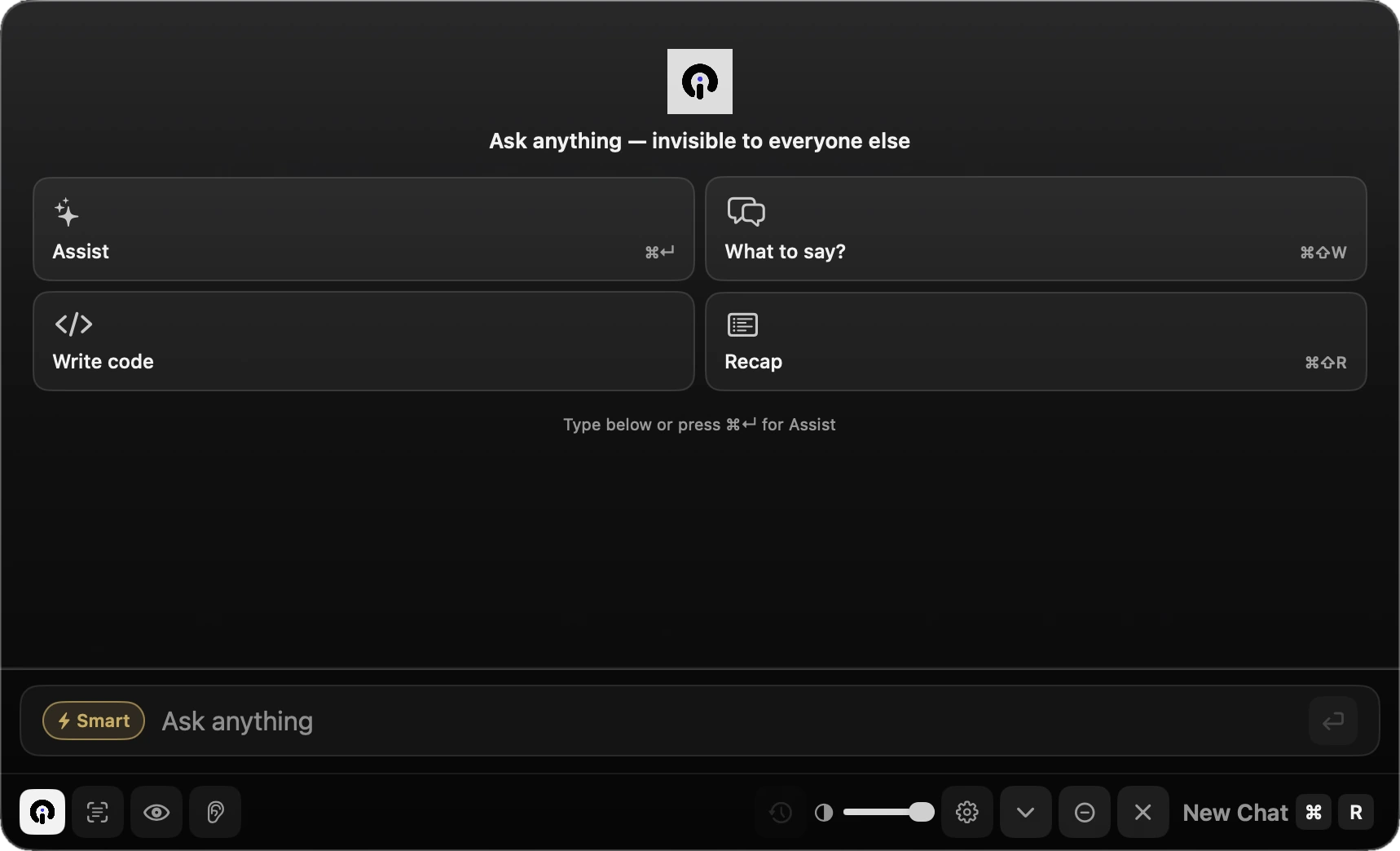
In a design review, an incident call or a client demo, incogno waits for you: when it hears a question it shows a small prompt, and one keystroke answers it. Its home screen has four actions, and a box to type anything else.
Most AI notetakers join as a participant and summarize afterwards. incogno helps you during the conversation.
| Meeting bot | incogno | |
|---|---|---|
| Shows up in the participant list | Yes | No |
| Host has to let it in | Often | Never |
| Captures your microphone | Depends on the tool | Never |
A copilot that listens to your calls has to earn its place. This is what happens to your data during a call.
Recording and transcription rules vary by workplace and by country, and some places require everyone's consent. Tell the people in your meeting, and get their consent where required. More on the Security page and in the list of subprocessors.
Every plan includes the private overlay and live transcription: 10 hours a month on Normal and 30 on Pro. Paid plans renew each month, and you can cancel anytime from your account.
$0
Every Pro feature for your first 30 minutes with the app running, or 30K AI tokens, whichever comes first. No credit card.
Start freeEverything you need for day-to-day meetings, with 2M AI tokens a month.
Choose NormalFor power users: 4M AI tokens a month, automatic screen vision and our most capable model in Coding and System Design modes.
Choose ProStill unsure? Write to support@incogno.ai and a person will reply.
No. It runs on your computer and listens to the audio your computer plays. Nobody sees a bot in the participant list.
Zoom, Google Meet, Microsoft Teams, Webex and Slack Huddles. No plugin or browser extension is needed.
Not on our servers. It streams over an encrypted connection, through our servers, to our speech-to-text providers for live transcription, and incogno doesn't train AI models on it. With the optional Deep analysis, a meeting's audio is uploaded once after the call for analysis.
No. It transcribes only the call audio that the other people speak.
A Mac with Apple Silicon on macOS 13 or later, or an Intel or AMD PC on Windows 10 (version 2004 or later) or Windows 11.
Every Pro feature is free for your first 30 minutes with the app running, or 30K AI tokens, whichever comes first, with no credit card. Paid plans renew monthly and you can cancel anytime from your account.
Every Pro feature for your first 30 minutes with the app running or 30K AI tokens, with no credit card. For Macs with Apple Silicon on macOS 13 or later, and Intel or AMD PCs on Windows 10 (version 2004 or later) or Windows 11.